
Error 088 happens when Group A (Segment Level 1) and Group B (Segment Level 7) submissions contain the same values in Data Element 2 (Incident Number) and Data Element 41 (Arrest Transaction Number), for the same ORI.
When you get Error 088 You will have to submit a delete file for the previous record (Group A Incident or Group B arrest) before submitting the new file again.
Two files will have to be submitted in this case
A delete file for the previous records.
Re-upload the file that got error 088 in the first place.
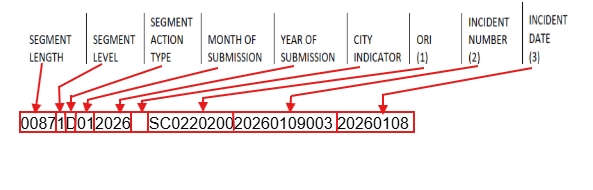
To create a delete file for a Group A incident, you have to open a new txt file and include the following information:
-Segment Length
-Segment Level “1” for Group A incidents.
-Segment Action Type “D” for delete
-Month of Submission
-Year of Submission
-City Indicator (Applicable only to direct reports)
-ORI
-Incident Number
-Incident Date
The file should look like this
Example:
00871D012026 SC022020020260109003 20260108
Save the file and upload it to the Crime Insight Repsoitory NIBRS Data Upload page.
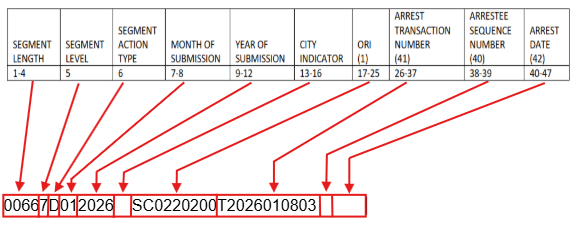
To create a delete file for a Group B Arrest, you have to open a new txt file and include the following information:
-Segment Length
-Segment Level “7” for Group B Arrest.
-Segment Action Type “D” for delete
-Month of Submission
-Year of Submission
-City Indicator (Applicable only to direct reports)
-ORI
-Arrest Transaction Number
-Arrestee Sequence Number (leave this blank to delete all arrestees in the report)
-Arrest Date
The file should look like this
Example:
00667D012026 SC0220200T20260108030000000000 (The last 9 zeros are there to indicate empty spaces)
Save the file and upload it to the Crime Insight Repsoitory NIBRS Data Upload page.
After uploading the delete file, you can re-upload the file that got error 088 (Whether it was a group A or Group B), provided that no new uploads have been done for any incidents in the file.